How to Outline an Article With an AI Assistant and Keep Your Own Angle
Write your angle in one sentence first, list your own points, then use the AI assistant to group, question and stress-test them. A seven-step outlining workflow that keeps the thinking yours.
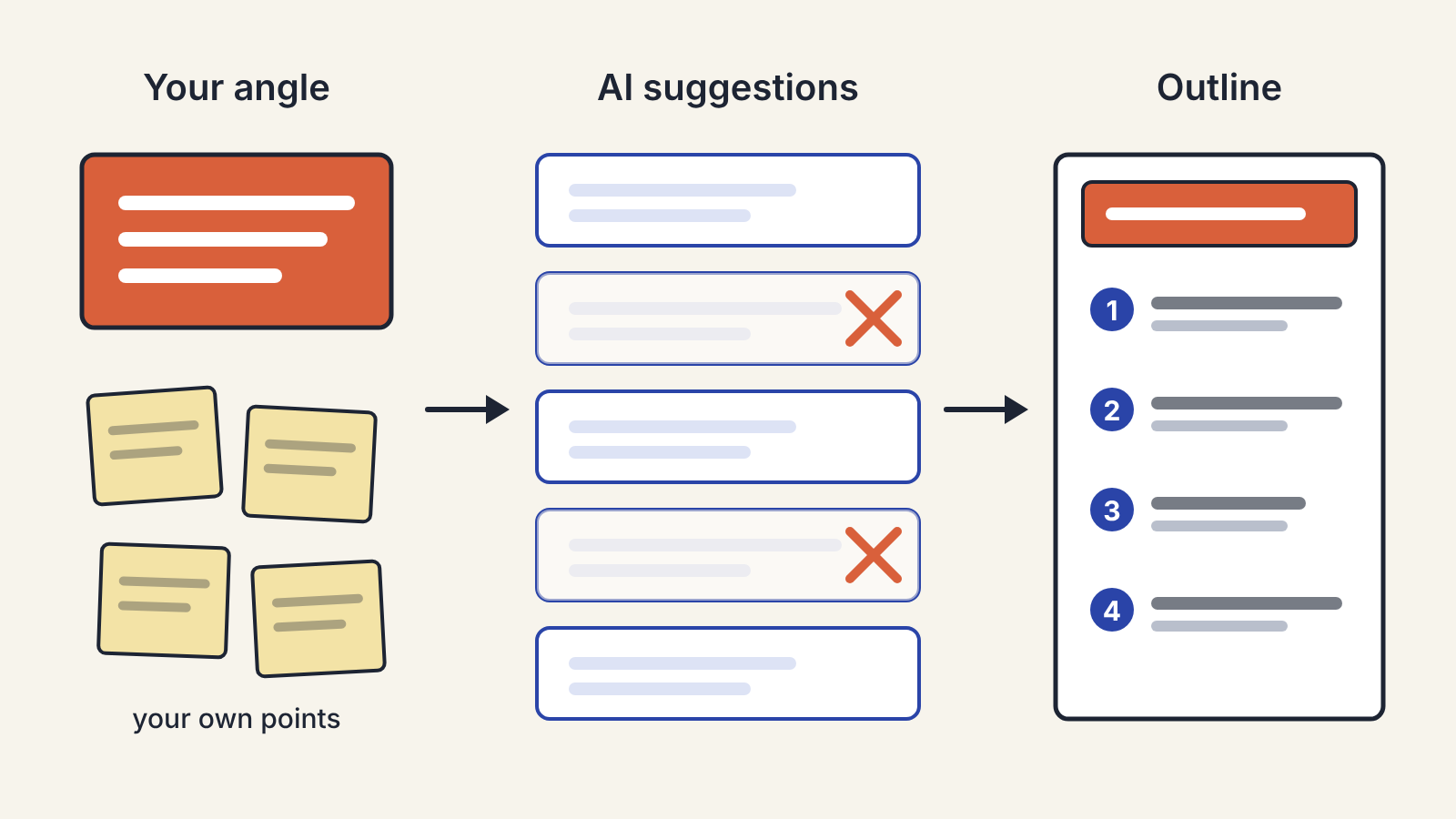
Write your angle down in one sentence before you open the AI assistant, then make the assistant work for that sentence instead of the other way round. That one habit is the difference between an outline that sounds like you and one that sounds like every other article on the topic.
An assistant is very good at producing the obvious structure for any subject: the five sections most writers would reach for, in the order most writers would put them. That is useful raw material. It is a poor place to start, because once a tidy outline is on the screen it is hard to argue with. Here is a workflow that keeps the thinking yours and hands the assistant the parts it is good at.
Step 1: Write the angle first, by hand
Before any prompt, answer two questions in plain words:
- Who is this for, and what do they already know?
- What is the one thing you want them to believe or be able to do when they finish?
Squeeze the answers into a single sentence. "Freelance writers who already use an AI assistant can cut their outlining time in half if they stop asking it for outlines and start asking it for objections." That sentence is your angle. It is opinionated, it names a reader, and it rules things out.
If you cannot write the sentence yet, you are not ready to outline. Spend ten minutes on notes instead: what made you want to write this, what you have seen people get wrong, the example you keep coming back to. Rough bullet points are fine. They are the material the assistant does not have.
Step 2: Dump your own points before asking for any
List every point you might make, in no order. Aim for more than you will use. Include the half-formed ones ("something about how editors hate this") and the examples you would tell a friend.
This step matters because of anchoring. If you see the assistant's list first, your own ideas start to feel like additions to its plan. If your list exists first, the assistant's ideas become additions to yours, and you judge them against your angle.
Step 3: Give the assistant the angle, the reader and your list
Now open the assistant. Paste in your angle sentence, a line about the reader and your raw list. Then ask for something narrower than "an outline". Prompts that tend to pay off:
- "Group these points into four or five sections that build towards the angle. Keep my wording where you can."
- "Which of these points does the reader already know? Which would surprise them?"
- "What objection would a sceptical reader raise after section two?"
- "What am I missing that a reader of this kind would expect to see?"
Each of these asks the assistant to react to your material. You get structure and gaps, while the substance stays yours.
Step 4: Filter every suggestion through the angle
Read what comes back with one question in mind: does this help the reader I named reach the point I named? Keep what does. Cut what does not, even if it is true and well put. A good outline has fewer sections than the assistant offers, and the cuts are where your judgement shows.
Watch for three things the assistant adds by habit:
- A background section that explains what the topic is. Your reader often knows already. Fold one line of context into the opening instead.
- A balanced pros-and-cons section when your angle takes a side. Keep the strongest objection and answer it; drop the rest.
- A summary at the end. Readers who got there do not need it. End on the last useful thing.
Step 5: Turn each heading into a claim
An outline of topics ("Research", "Drafting", "Editing") tells you what to write about but not what to say. Rewrite each heading as a sentence the section will prove: "Research goes faster when you collect sources before you ask questions." Now each section has a job, and you can see at a glance whether the order makes sense. If two headings make the same claim, merge them. If a heading has no claim, it probably has no reason to exist.
This is also the moment to note what evidence each section needs: an example from your work, a source you have read, a step the reader can try. If a section needs a fact you do not have, mark it now. Do not ask the assistant to supply the fact and trust it; checking those is a job of its own, covered in our guide to checking facts an AI assistant gives you.
Step 6: Stress-test the order with the assistant
Once the outline is yours, the assistant is useful again as a reader. Paste the claim-headings and ask: "Read these as the target reader. Where would you get lost or stop reading?" Or ask it to argue the opposite of your angle and see which section has to carry the answer. You are not asking it to fix anything. You are asking it to find weak joints so you can fix them.
Step 7: Keep the outline loose enough to change
An outline is a plan for the first draft, not a contract. When the draft finds a better example or a stronger order, follow it and update the outline afterwards. The angle sentence is the only part that should be hard to change; if it moves, the outline should be rebuilt around the new one.
When the draft is done, the same rule applies in reverse: the assistant can help you edit, but the voice has to come from you. Editing an AI-assisted draft so it still sounds like you walks through those passes.
A quick version for short pieces
For a newsletter or a short blog post, the whole thing fits into ten minutes:
- Write the angle sentence.
- Jot five or six points of your own.
- Ask the assistant: "Which of these should go, and what is missing for this reader?"
- Cut, reorder, and write each remaining point as a one-line claim.
That is an outline. It took one prompt, and every line in it is something you decided to say.
